What if students could feel the pressure of a startup decision before they ever risk real money? Business concepts can be hard to grasp from a textbook alone. A startup simulation for classroom learning makes choices visible: students weigh trade-offs, pitch ideas, and consider how decisions shape what happens next.
The game is only the starting point. To turn excitement into learning, choose an activity that fits your lesson goals, works with your classroom routine, and gives students something specific to reflect on afterward. A clear structure helps keep the focus on learning, not just on who wins.
This guide explains how to choose and run a classroom startup simulation, then lead a debrief that connects gameplay to entrepreneurship concepts such as pitching and fundraising. You’ll also see how Studio Showdown, a tabletop strategy game in which students act as studio founders, can give teams a shared setting to practice those decisions. Set a learning target, make the choices count, and bring the experience back to concepts students can use beyond the game.
Key Takeaways
- Use a startup simulation for classroom learning to help students explore founder decisions through practice, not just explanation.
- Look for a clear learning cycle: introduce a challenge, make a decision, examine what follows, and reflect on the trade-offs.
- Compare digital and tabletop formats against your goals for collaboration, facilitation, feedback, and classroom setup.
- Plan the activity around specific learning objectives, then adapt the pacing and grouping to fit your class.
- Use the debrief to connect students’ choices to entrepreneurship concepts. Studio Showdown is a tabletop option focused on video game development and entrepreneurship.
What Is a Startup Simulation for the Classroom?
A startup simulation for classroom learning gives students a business scenario and asks them to make founder-style decisions within it. Rather than only hearing how a company might develop, students consider options, choose a direction, and examine the consequences within the activity. A business simulation uses a model of business activity as a learning tool; a startup-focused version puts entrepreneurial choices at the center.
A simulation differs from a lecture, a case study, or an unstructured business-themed game. A lecture explains ideas. A case study asks students to analyze decisions already made. A simulation gives them decisions of their own to make within a defined scenario. Competition can make an activity lively, but it does not guarantee learning. The value comes from connecting choices to consequences and making time to reflect on what happened and why.
Simulations can be digital or tabletop. Choose a format by looking at your lesson goal and classroom routine. Digital play may fit independent interaction with a modeled environment; a tabletop activity can bring decisions and discussion into shared view. Neither format is automatically better. Look for meaningful choices, clear instructions, and a useful way to reflect afterward.
What students do during a startup simulation
Students take on roles in a business scenario, evaluate available options, and decide how to respond to a challenge. They might consider how to pitch an idea or approach fundraising. There does not need to be one correct answer. The learning comes from asking students to explain their reasoning and weigh possible consequences.
In a team, students can compare priorities before committing to a choice. One student may favor a bold pitch, while another prefers a more cautious approach. Ask the group what each option could make possible, what it might require, and what risks it could introduce. This makes the decision-making visible, not just the final result.
What a classroom simulation can teach
Well-framed decisions give abstract entrepreneurship concepts a practical anchor. Students can connect pitching to communicating an idea, resource choices to setting priorities, and risk to making a decision without knowing exactly what will happen. These are opportunities to practice, not guaranteed outcomes.
As students explain their reasoning, listen to teammates, and respond to changing circumstances in the scenario, they also practice communication, strategic thinking, and collaboration. Close with reflection: Which choice was hardest? What trade-off did the team accept? What would they reconsider? These questions help students put their experience into words and carry the learning into the next challenge.
How a Classroom Startup Simulation Turns Business Concepts into Decisions
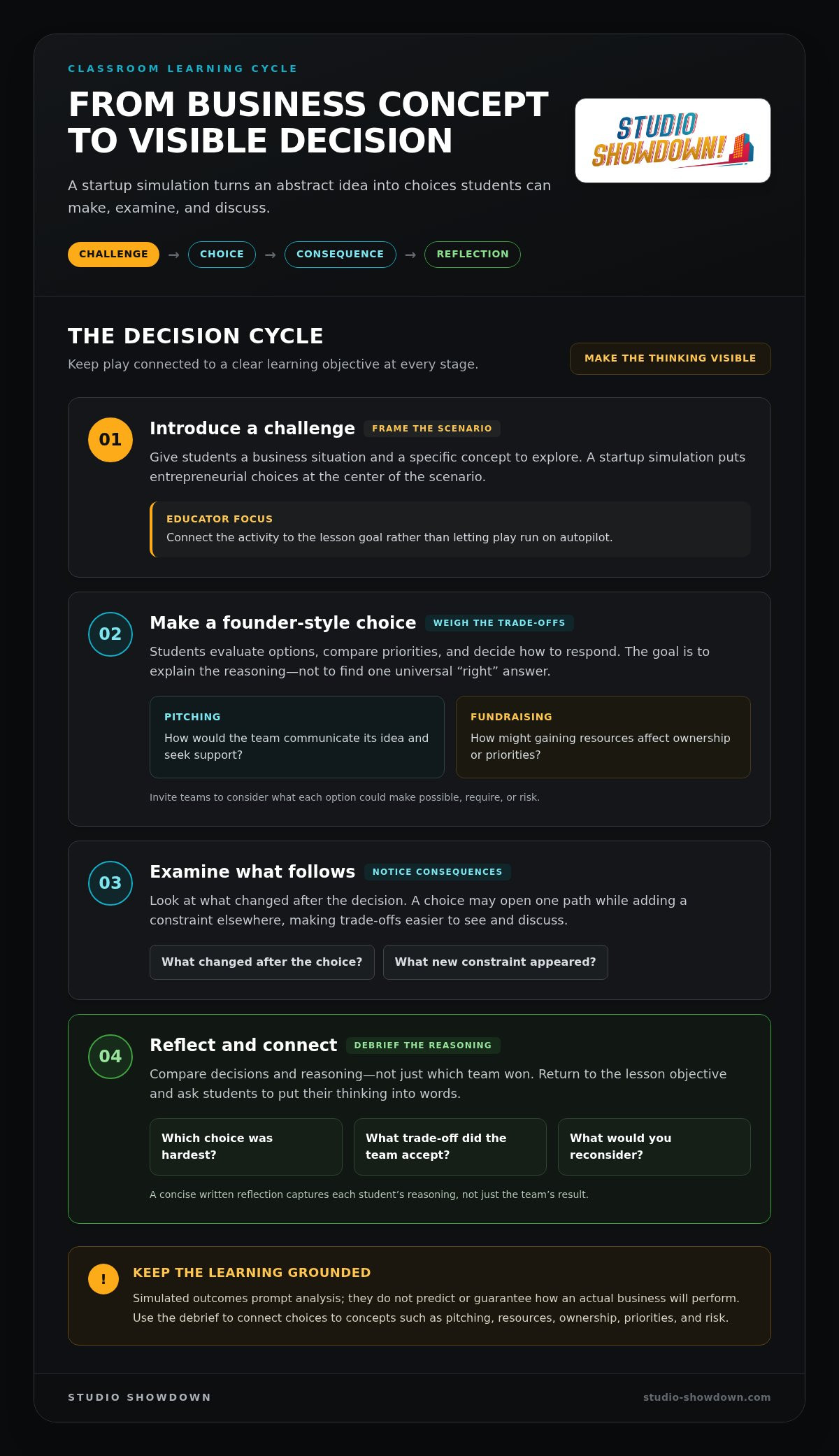
A simulation gives students a decision cycle they can see and discuss: introduce a challenge, make a choice, observe what follows, then reflect. The educator’s role is to connect each stage to a learning objective instead of letting play run on autopilot. Harvard Business Publishing Education’s examples of how educators teach with simulations also highlight the importance of connecting activities to classroom learning.
Experiential learning through simulation means learning by making a choice, examining its consequences, and reflecting on what the experience reveals. A choice may open one path while adding a constraint elsewhere, prompting students to consider trade-offs rather than search for a universal “right” answer. Keep the distinction clear: simulated outcomes prompt analysis. They do not predict or guarantee how an actual business will perform.
From entrepreneurship concepts to student choices
Start with the concept you want students to explore, then frame it as a decision. For pitching, ask teams how they would communicate an idea and seek support. For fundraising, invite them to consider how gaining resources might affect ownership or priorities. These are discussion prompts, not claims that every funding choice has the same result.
Before teams decide, ask what information they would want and why it matters. What would help them judge whether a pitch is persuasive? Which priorities would shape their approach to seeking support? This turns a business term into a reasoned choice. The goal is not to reward confidence alone, but to help students make their assumptions and thinking visible.
Why the debrief makes the learning visible
After the activity, compare decisions and reasoning instead of presenting one team’s strategy as the winning formula. Ask: What changed after your choice? What evidence or assumption mattered most? What would you reconsider if you had another opportunity to decide? Answers can reveal different approaches, including choices that seemed promising but introduced new constraints.
Close by returning to the lesson objective. If the focus was pitching, ask students to identify what made an idea clear or compelling. If it was fundraising, revisit how resources, ownership, and priorities can pull in different directions. A concise written reflection captures each student’s reasoning, not just the team’s result. For a tabletop activity built around studio-founder decisions, explore the Studio Showdown board game.
Digital or Tabletop Startup Simulation: Which Fits Your Classroom?
Choose the format that serves the lesson, not the one that looks more modern. A startup simulation for classroom use can be digital or tabletop; either can support learning when students make decisions, examine consequences, and connect the experience to a clear objective. The quality of the choices and debrief matters more than screen use alone.
Compare how each format fits your class routine. Think about whether you want students to work independently, discuss decisions as a group, or combine both approaches.
| Format | Strengths | Teaching fit | Educator considerations |
|---|---|---|---|
| Digital | Can support individual interaction and self-paced decision-making. | Useful when students need to work independently or engage through classroom devices. | Consider device access, setup needs, and the feedback or accessibility features of the specific simulation. |
| Tabletop | Brings choices into a shared physical space, creating natural opportunities for conversation. | Useful when the goal is team discussion, visible decision-making, and collaborative reflection. | Plan how students will share materials, make group choices, and keep their reasoning visible for the debrief. |
When a digital simulation is a strong fit
Digital delivery may suit a lesson where students need to work at their own pace or use devices as part of the classroom routine. Startup Wars and Founder Runway are examples of digital approaches, not products from Studio Showdown. Features vary by simulation, so do not assume that a particular format includes specific feedback, access options, or facilitation tools. Match the activity to your objective, then decide how students will record and discuss their choices.
When tabletop play supports classroom interaction
A shared tabletop activity puts team decisions in view. Students can talk through alternatives, hear competing priorities, and explain why their group chose one path. Facilitation helps make that discussion useful: prompt teams to state their reasoning, then use the debrief to connect it to the lesson.
Studio Showdown is a strategy board game about video game development and entrepreneurship. Students act as studio founders and encounter challenges such as pitching and fundraising. Its tabletop format gives teams a shared setting for exploring those decisions. Choose it when collaboration and discussion support your objective, then use reflection to connect the experience to the lesson. Neither format guarantees stronger learning for every group; the activity design and facilitation matter.
How to Run a Startup Simulation: Setup to Debrief
A classroom startup simulation works best as a planned learning sequence, not a game dropped into the lesson. Set the objective, introduce the scenario, facilitate play, debrief decisions, then ask students to reflect individually. Adapt the pacing and group structure to your class and the activity rather than forcing a fixed duration.
Prepare the activity around a clear learning objective
Before play, choose one or two concepts for students to notice, such as pitching an idea or weighing resource priorities. Tell students what they will do, how their roles work, and how you expect them to discuss different views. Clear, plain instructions leave more room for focused decisions.
Prepare a simple observation sheet with three prompts: What did the team decide? Why did they decide it? What question or concern came up? Use it to track reasoning and concept use, not just results. These notes give you concrete points to revisit during the debrief without interrupting every team.
Facilitate play, reflection, and assessment
During play, listen for moments when teams weigh alternatives. Pause when useful and ask them to explain their reasoning: What goal is guiding this choice? What might the team gain, and what could become harder? Keep the questions open. The aim is to bring thinking into view, not steer every group toward one answer.
After the activity, use a consistent debrief to compare decisions across teams. Invite students to respond to these prompts:
- What was your team trying to achieve?
- What trade-off did you accept, and why?
- What changed after your decision? What consequences surprised you?
- What information or assumption shaped your choice?
- What might you reconsider, and how does that connect to our learning objective?
Look for observable evidence: students explain their reasoning, use the target concept accurately, and reflect on what they might change. A final individual response helps distinguish each student’s learning from the team’s shared performance. For a startup simulation for classroom use centered on studio-founder decisions, explore Studio Showdown for your classroom.
Bring Studio Showdown into Your Classroom Startup Simulation
Once you have matched a simulation format to your learning goals and planned how students will reflect, consider whether a shared tabletop experience suits the lesson. Studio Showdown is a strategy board game about video game development and entrepreneurship. Students take the role of studio founders and face challenges such as pitching and fundraising. The game gives students a concrete context for exploring how entrepreneurial decisions connect, while your objectives and discussion guide the learning.
Match Studio Showdown to a classroom learning goal
Choose the concept you want students to focus on before introducing the activity. If the objective is pitching, listen for how students explain an idea and think about seeking support. If it is fundraising, guide discussion toward the relationship between resources, ownership, and priorities. Ask students to explain the reasoning behind their decisions, not just describe what happened.
Use the game as a starting point for purposeful classroom conversation. Invite teams to compare their approaches: What were they trying to achieve? What trade-offs did they consider? What would they want to know before deciding differently? These prompts connect play to entrepreneurship concepts without suggesting that a simulated decision guarantees a real-world result. Adapt the discussion to your goals and your students’ responses.
Choose a practical next step for your program
Educators can use Studio Showdown: Educator Edition in classroom learning. The Classroom Bundle is designed for educational settings that need multiple sets. Choose the option that fits how you plan to use the activity across your groups, and shape the implementation around your teaching plan.
Educator workshops provide instruction on implementing the game in the classroom and integrating its mechanics into broader STEM and business curricula. Whether you use the game independently or in a workshop, keep the instructional sequence in view: set an objective, make space for student decisions, and connect those decisions back to the lesson in the debrief.
Ready to bring entrepreneurial decision-making to the table? Explore Studio Showdown’s classroom options and consider how the studio-founder scenario could support your next entrepreneurship lesson.
Turn Startup Decisions into Classroom Practice
A strong startup simulation for classroom learning starts with a clear objective, gives students meaningful decisions, and makes time for reflection. Choose digital or tabletop play based on the kind of participation you want, then use the debrief to connect students’ reasoning to entrepreneurship concepts.
Studio Showdown brings those choices to the table through a strategy board game about video game development and entrepreneurship. Developed by VGCD Academy and DEMYSTIFIED Studios, it gives students hands-on practice with pitching and fundraising as they act as studio founders. Educators can use classroom options including Studio Showdown: Educator Edition and the Classroom Bundle.
Ready to bring shared startup decisions into your lesson? Explore Studio Showdown for your classroom and choose the option that fits your teaching goals. Give students room to choose, discuss, reflect, and carry their learning into the next challenge.
Frequently Asked Questions
How do you use a startup simulation in a classroom?
Start with a learning objective, then explain the scenario, student roles, and expectations. Give teams space to make decisions and discuss why they chose a particular approach. After play, lead a debrief about trade-offs, consequences, and alternatives. Close with a short individual reflection tied to the objective. Adapt pacing and grouping to your class, and assess student thinking rather than the game result alone.
Are startup simulation games effective for teaching entrepreneurship?
Startup simulations give students a chance to practice entrepreneurial thinking through decisions, rather than only hearing about business concepts. Their usefulness depends on how well the activity supports instruction: students should explain their choices and connect them to ideas such as pitching or fundraising. A simulation can prompt valuable discussion, but its outcomes are modeled for learning. They should not be treated as proof that a student or team will achieve a particular business result.
What is the difference between a digital and tabletop startup simulation?
A digital simulation presents decisions and feedback through software, while a tabletop simulation brings students together around a physical game. Digital play may fit device-based activities or individual pacing; tabletop play can make shared discussion and team decisions visible. The best fit depends on your learning goals, classroom resources, and desired interaction. Neither format guarantees better learning. Give students clear instructions and guide discussion after play to connect the experience to the lesson.
Can a board game teach startup and business concepts?
A board game can give students a structured setting to discuss business decisions, compare strategies, and examine trade-offs. Studio Showdown, developed by VGCD Academy and DEMYSTIFIED Studios, is a strategy board game about video game development and entrepreneurship. Students act as studio founders and practice challenges such as pitching and fundraising. Connect play to explicit lesson concepts, ask students to explain their reasoning, and debrief what they learned. The game complements instruction; it does not guarantee mastery.
How do you assess learning after a classroom business simulation?
Assess what students can explain, how they apply the lesson’s concepts, and what they identify in reflection. A short written response, team explanation, or guided discussion can reveal their reasoning and where further clarification may help. For example, ask students to describe a decision, name the trade-off they considered, and connect it to a target concept. Match the assessment to your objective, and do not judge learning only by which team appears to win.